Create a Binary Search Tree Visualizer in React

I'm a developer based in India who loves Frontend interactive projects.
Implementing Data Structures and Algorithms with visualization is an effective way to learn to program. You can find a lot of similar projects online on Github. This project includes tree traversals as of now. More features like search (DFS and BFS) will be added soon. You can find the whole code on Github Link
Check the app on — binary-search-tree-visualizer.netlify.app
Create a Project
You can create a React app in a couple of ways. The one I used is the create-react-app generator. The project structure looks like this:
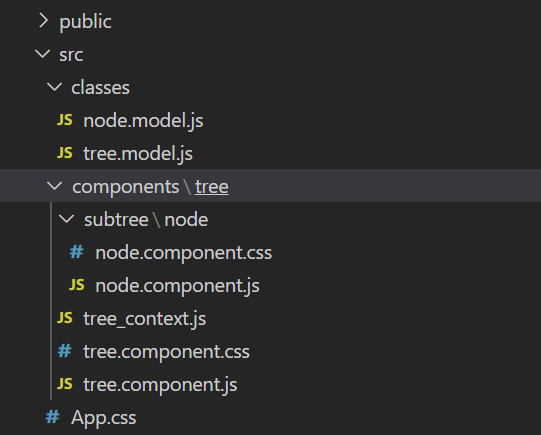
I created 2 folders — classes and components to store POJO classes and React components respectively. The Tree component holds the whole layout with the Node component as the nodes of the tree.
The NodeModel class includes key, left and right attributes that point to key, left-node, and the right-node objects.
The TreeModel in turn, contains a root attribute that points to the root node and methods for the insertion, deletion and tree traversals.
Tree Generation
The user has the option to insert a key by typing in. As the insertion of a Node occurs, the function is triggered adding the NodeModel object to the TreeModel . The whole component is updated and the tree is drawn recursively.
return <div className="subtree">
        <Node key={node.key} id={node.key} value={node.value} />

        {node.left && !node.right && <div className={`children left`}>
          {constructTree(node.left)}
        </div>
        }
        {!node.left && node.right && <div className={`children right`}>
          {constructTree(node.right)}
        </div>
        }

        {node.left && node.right && <div className={`children`}>
          {constructTree(node.left)}
          {constructTree(node.right)}
        </div>
        }
      </div>
Tree Traversal
The code for all the three traversals is similar to an extent while implementing recursively. I’ll be sharing the Preorder traversal below and the rest of the traversals can be read on the Github link.
preorder(node, fn) {
        if (node !== null) {
            fn(node);
            this.preorder(node.left, fn);
            this.preorder(node.right, fn);
        }
    }
The callback function seen in the code is used for storing the visited nodes to an array in order. The array is then traversed for further visualization.
Visualization
A Context Api is used to track the currently visited node in the tree. While traversing through each node in the array, the context is updated and a visited class is being added to the current node. The background color changes in the current Node Component .
A setTimeout function is given to stay at each node for 1 second.
I did not attempt to highlight each visited node while the compiler is busy figuring out the order inside the preorder function, as the setTimout will add delay to every recursion which will further increase the total time of animation.
But now, since we traverse an array, the complexity becomes O(n) instead of exponentials.
That’s it! Thank you for reading and I hope you got to learn something from the article.